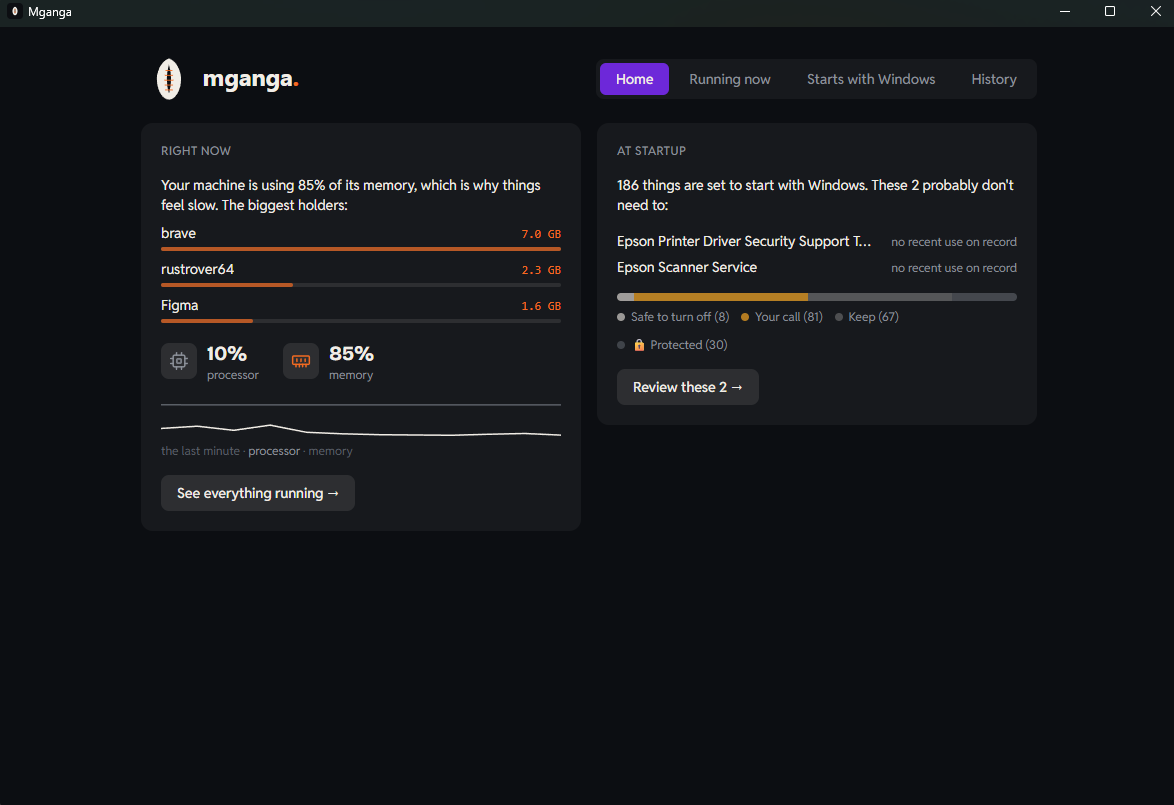
Two questions, answered honestly
Why is my machine slow right now?
One honest sentence, updated live: how strained your processor and memory are, and exactly which apps are responsible, with the numbers to prove it. No mystery scores, no "247 issues found".
What starts itself with Windows?
Every autostart from the registry, startup folders, scheduled tasks and services, each with a verdict and a reason. Backed by real evidence: when you actually last opened the app.
How it heals
- Gentle first, violent last The first suggestion is always Efficiency mode, the same gentle throttle Windows itself uses: the app keeps working, just quietly. Then pause. Stop is last, de-emphasized, and always confirmed.
- Attention only where it costs you The interface is calm and near-monochrome. Orange appears in exactly one situation: something is costing you resources right now.
- Verdicts with evidence "Safe to turn off" comes with the why: what the app does, who makes it, and when you last used it. When it is genuinely your call, Mganga says so instead of pretending to know.
- Nothing is ever deleted Autostart switches flip the same bytes Task Manager flips, every change is recorded in an audit log, and every change has an Undo. The things that keep Windows and your security running are protected and untouchable.
Built not to be trusted blindly
Mganga runs without administrator rights.
Machine-wide changes go through a small elevated helper
(mganga-broker.exe), started only when needed with one UAC
prompt, talking over a named pipe. The helper re-validates every request
against the same safety rules the app uses, compiled into both binaries,
so neither side can be talked into something the rules forbid.
And because trust should not require faith: the entire codebase is open source under GPL-3.0, which means every fork of Mganga must stay open source too. In a category full of closed-source scareware, the license is part of the safety model.